
AP Documents from PDFs: Recognition of Project-Related Data
[1]The primary thing I wanted to avoid was the the 15-word subject in the sentence, which could cause misreading. This preserves the general phrasing while avoiding this.2025/02/2711:31:56-05:00Manual entry of the project-related AP bills based on[2]Manual entry of the project-related AP bills base.. 2025/02/2711:28:47-05:00[3]insert2025/02/2711:28:47-05:00For project-related expenses, your company may receive PDF[4]insert2025/02/2716:32:41-05:00 invoice document[5] document2025/02/2716:32:45-05:00s [6]insert2025/02/2711:29:26-05:00attached toreceived by[7]received by2025/02/2711:29:26-05:00 emails[8]s2025/02/2714:11:25-05:00[9]insert2025/02/2711:29:34-05:00. Manually entering the related AP bills may be a[10] a2025/02/2714:08:20-05:00 time-consuming procedure[11] procedure2025/02/2714:08:18-05:00, especially if your company is managing numerous projects at a time. If the <i>Projects</i>, <i>Construction</i>, and <i>Recognition of Project-Related Documents</i> features are included in your license and enabled on the <xref href="../UserGuide/CS_10_00_00.dita"/> (CS100000) form[12]If the <i>Projects</i>, <i>Construction</i>, and .. 2025/02/2714:09:27-05:00[13]split2025/02/2714:56:28-05:00
[14]insert2025/02/2714:11:39-05:00In MYOB Acumatica, you can simplify and automate the management of AP bills for any projects, including the [15]the 2025/02/2714:56:45-05:00construction ones, to increases[16]s2025/02/2714:11:51-05:00 efficiency and accuracy in tracking project-related expenses.[17]insert2025/02/2714:09:31-05:00[18]You could instead make this a note of some type. We sometimes do this at the end of a topic intro. 2025/02/2714:46:42-05:00 This functionality is available if the Projects, Construction, and Recognition of Project-Related Documents features are included in your license and enabled on the Enable/Disable Features (CS100000) form.
Recognition of Direct Bills Related to Projects
On the Incoming Documents (AP301100) form, you can upload a PDF to recognize a direct bill that is related to a project. After the document is recognized, you can manually [19]This use of "populate" is not right; see the UD entry.2025/02/2719:17:11-05:00populate[20]populate2025/02/2719:14:07-05:00[21]insert2025/02/2719:14:07-05:00enter the project budget key in the lines of the recognized AP document, and proceed[22]proceed2025/02/2719:17:13-05:00[23]insert2025/02/2719:17:13-05:00continue processing with[24] with2025/02/2719:20:18-05:00 the created document. For more information about[25]insert2025/02/2719:20:25-05:00 the recognition process, see AP Documents from PDFs: General Information.
Recognition of Bill[26]insert2025/02/2714:46:58-05:00s Linked to Project Commitments
If an AP document that is being recognized relates to a project commitment, the system recognizes the following information in the bill line:
- If a purchase order line with the[27] the2025/02/2720:21:18-05:00 matching information is found, the system specifies the found purchase order number in the recognized line and automatically populates[28]populates2025/02/2720:22:24-05:00[29]insert2025/02/2720:22:24-05:00inserts the project budget key (project, project task, and cost code) based on the corresponding purchase order line. You can also link AP document lines to purchase order lines manually if no exact matching [30]Not document line?2025/02/2720:23:17-05:00document was found by clicking Link PO Line on the table toolbar and selecting the needed purchase order line.
- If a subcontract line with the[31] the2025/02/2720:21:20-05:00 matching information is found, the system specifies the found subcontract number in the recognized line and automatically populates[32]populates2025/02/2720:22:29-05:00[33]insert2025/02/2720:22:29-05:00inserts the project budget key (project, project task, and cost code) based on the corresponding subcontract line. You can also link AP document lines to subcontract lines manually if no exact matching [34]Not document line?2025/02/2720:32:16-05:00document was found by clicking Link Subcontract on the table toolbar and selecting the needed subcontract line.
The following screenshot shows a recognized AP bill that has a line related to a purchase order for a project, a line related to a subcontract for a project, and two lines that are not related to any project.
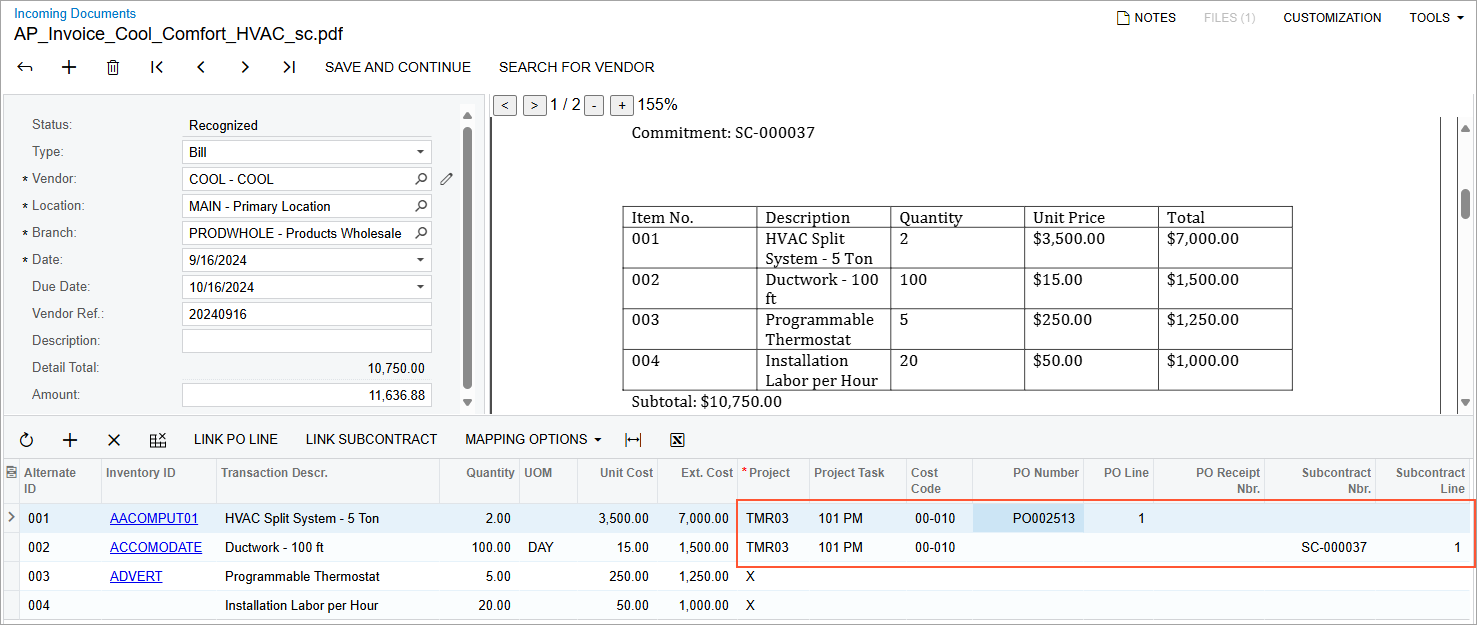
When the user clicks Save and Continue for the recognized bill, the system creates an AP bill and opens the Bills and Adjustments (AP301000) form with the AP bill. The bill lines are added to the Details tab and include the following information:
- [38]"For a direct AP bill"? Only one is being viewed on the form and discussed. Or do you mean something like "For lines of direct AP bills"?2025/02/2721:04:49-05:00For the direct AP bills, the system copies the project budget key[39]insert2025/02/2721:04:53-05:00, along with other line information.
- For the project-related lines linked to purchase order[40]insert2025/02/2721:05:42-05:00 lines, the system also copies the purchase order and receipt numbers to the PO Number and PO Receipt Nbr. columns, respectively.
- For the project-related lines linked to subcontract[41]insert2025/02/2721:05:49-05:00 lines, the system copies the subcontract number to the Subcontract Nbr. box.
The document is created with the On Hold status, so you can make any needed corrections before processing it further.