Funds Transfers: General Information
In MYOB Acumatica, you can record cash transfers from one bank account to another, or between cash accounts that are linked to the same GL account and that represent the same bank account. When you record a funds transfer, you can also register a charge associated with it. For example, when you move funds between different bank accounts, you can immediately record a service fee associated with the transfer.
Learning Objectives
You will learn how to record a funds transfer between cash accounts.
Applicable Scenarios
You record a funds transfer when you need to redistribute funds between different companies or branches of your organization. You can also move funds from one bank account to another—for example, when you want to deposit funds from one of the company's checking accounts to a company savings account.
Processing of a Funds Transfer
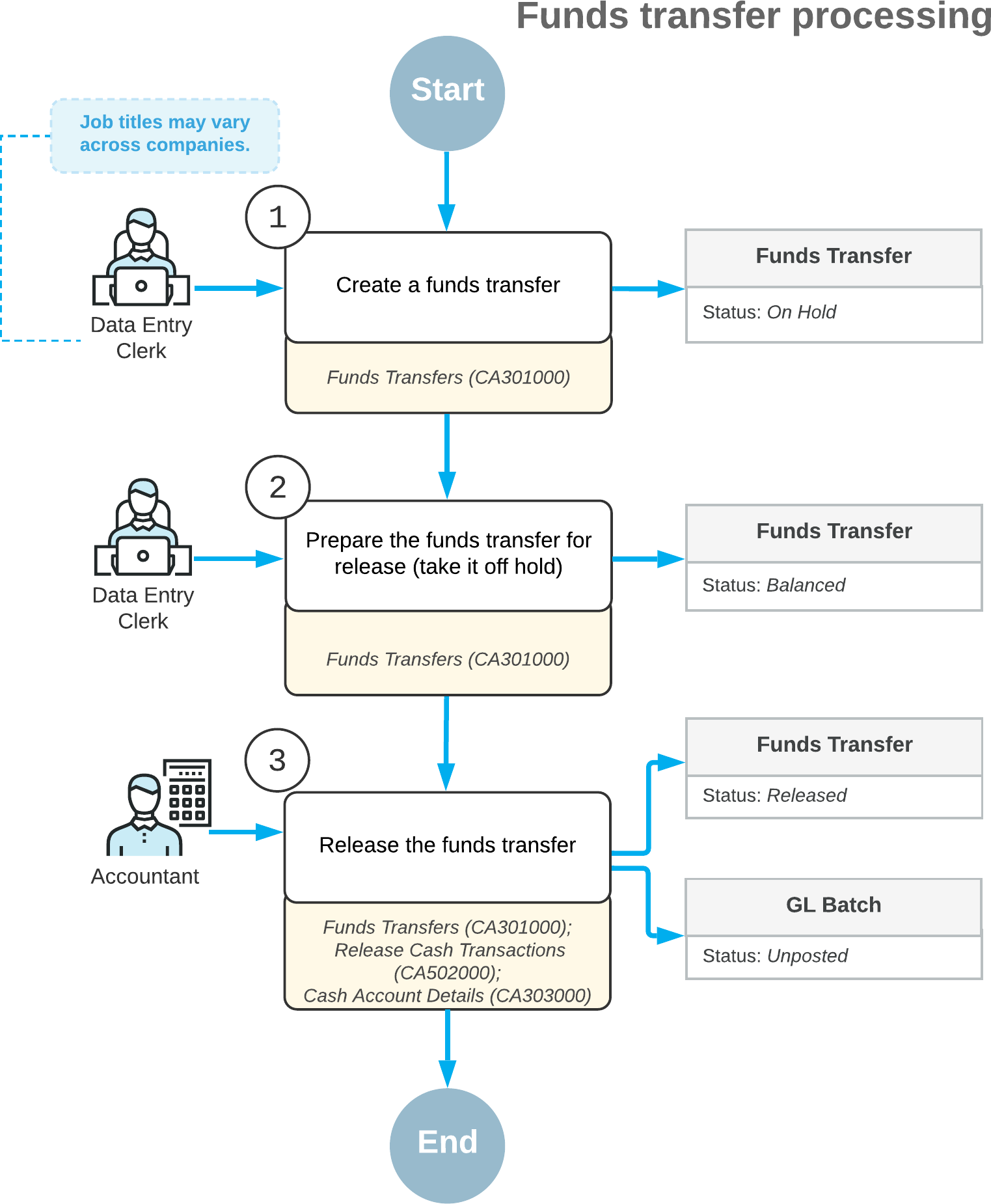
To process a funds transfer, you first create it on the Funds Transfers (CA301000) form. At any time after creation, you can release the transfer on any of the following forms:
- Funds Transfers: You release the funds transfer you are viewing by clicking Release on the form toolbar.
- Release Cash Transactions (CA502000): You use this form to release a particular funds transfer or multiple funds transfers. On this form, funds transfers have the Transfer transaction type, and [1]One thing that we did not explain earlier, though, is what transactions correspond to a particular funds transfer. We should explain this establish context for this bullet and the next one, as well as other mentions of the transactions. The release of the document has not yet occurred, so I assume you are not talking about the GL batch. Are we talking about cash transactions? What transactions are generated for each transfer? What determines how many and which transaction there are for each? Without a brief explanation of this seemingly key concept (it comes up in the first sentence of the next topic too), it's not clear how we went from one funds transfer to multiple transactions associated with the transfer, or how many transactions there are for each.2020/06/1516:09:46-04:00transactions that correspond to the same transfer have the same transaction number. [2]But are you really releasing the TRANSACTIONS as this says or are you releasing the FUNDS TRANSFER as the first sentence of this bullet (after the form name) says?2020/06/1523:41:52-04:00To release all transactions of a particular funds transfer, you need to select only one transaction of it by selecting the unlabeled check box in the row of the transaction; when you release it by clicking Release on the form toolbar, the system releases the other transactions automatically.
- Cash Account Details (CA303000): You can use this form to release a particular funds transfer or multiple funds transfers. On this form, you start by selecting a cash account, which can be the source account or the destination account for your funds transfer. The system displays a list of transactions that includes the funds transfer transaction of the Transfer Out or Transfer In type, depending on whether the account you selected is a source or destination account, respectively. [3]Same question2020/06/1523:45:59-04:00To release all transactions of the funds transfer, you need to select only one transaction of the funds transfer by selecting the unlabeled check box in the row of the transaction; when you click Release on the form toolbar, the system releases the other transactions automatically.
During processing, a funds transfer can have the following statuses.
| Status | Description |
|---|---|
| On Hold | The transfer is being edited and cannot be released. |
| Balanced | The transfer is balanced and can be released. |
| Released | The transfer has been released. |
Addition of Expenses
You can record transfer expenses and charges in a funds transfer by adding a row to the table on the Funds Transfers (CA301000) form and filling in the cash account, entry type, and any additional settings of the expense or charge. Before you record charges, make sure that an entry type is configured that provides the default details for the transaction, including the offset account and subaccount, if subaccounts are configured in your system. For more information, see Registration of Finance Charges.
The expenses you record can include taxes. For the details about creating a funds transfer with taxable expenses, see Processing Funds Transfers with Taxable Fees.
Process Diagram
The following diagram illustrates the workflow of funds transfer processing.