
[1]Tatiana, because of the various issues cited, I would like to see this topic again, if possible.2023/08/3117:46:16-04:00Workflow-Identifying Fields of the Second Level: General Information
This topic provides information about workflow identifiers (that is, workflow-identifying fields, which are fields whose values determine the workflow to be used) of the second level. You will also learn how to create different workflows that use these identifiers.
Learning Objectives
In this chapter, you will learn how to create separate workflows for various workflow identifiers of the second level.
Applicable Scenarios
You use workflow identifiers of the second level when you have multiple types of entities on a form, and you need to create separate workflows for each of these entity types.
Example of Workflow Identifiers of the Second Level
In MYOB Acumatica, the workflows for the Sales Orders (SO30100) form are based on the predefined automation behavior, which can be one of the following:
- Sales Order
- Transfer Order
- Invoice
- Quote
- Credit Memo
- RMA Order
- Blanket Order
- Mixed Order
[3]I know I have made this point before, but it is problematic that we did not define what the second-level identifiers are, and we are just getting around to illustrating it--but even here, we are doing so only through an example. This would be sufficient if we had already explained what workflow identifiers of the second level are, but we had not.lfy_h5k_syb2023/08/3117:16:05-04:00TBD4lfy_h5k_syb42023/09/0814:04:45+03:00On the Order Types (SO201000) form, you can create multiple order types that are based on the same automation behavior. Without the use of workflow identifiers of the second level, on the Workflows page, you cannot create separate workflows for these custom order types, because for a particular order type, the system uses the workflow of the automation behavior this order type is based on.
If for a form, a developer has specified a type identifier for a workflow in the code (by using Workflow API), then you can select a workflow-identifying field of the second level for this form. [4]Is this the sort of phrasing we might use in our definition of second-level identifiers?2023/08/3117:18:49-04:00As a result, you can create a workflow for each pair of the type identifier value and the subtype identifier value. This functionality provides greater flexibility for the creation of workflows.
Forms with Subtype Identifiers
In an out-of-the-box system, you can create workflows that use the subtype identifier for the following forms:
- Sales Orders (SO30100)
- Purchase Orders ([5]Purchase order types: Normal, Standard, Blanket, Drop-Ship, Project Drop-Ship2023/08/1420:12:30+03:00PO301000)
- Purchase Receipts ([6]Types: Receipt, Return, Transfer Receipt2023/08/1420:14:21+03:00PO302000)
- Landed Costs ([7]Types: Landed Cost only2023/08/1420:14:39+03:00PO303000)
- Subcontracts (SC301000)
- Service Orders ([8]Service order types: Consulting Services Staff development Installation and maintenance of target equipment Installation Services Maintenance, repair and operations Quotes Routes Route services Customer Training Services2023/08/1420:21:28+03:00FS300100)
- Appointments ([9]The same order types as for service orders (except for Quotes--not used).2023/08/1420:23:47+03:00FS300200)
On other forms of MYOB Acumatica, you can implement multiple workflows first by using the type identifier; if needed, you can use the subtype identifier.
Creation of Separate Workflows for Identifiers of the Second Level
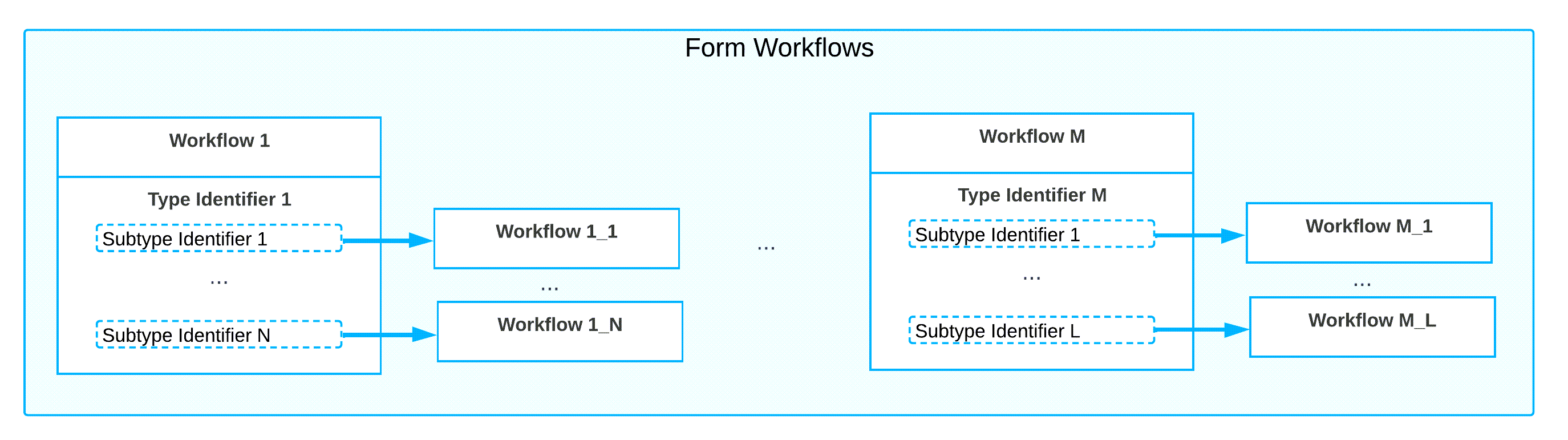
On the Workflows page of the Customization Project Editor, you can define workflow selection to be based on the value of a type identifier and then further based on the value of the subtype identifier. A workflow defined for the subtype identifier value inherits its configuration from the workflow defined for the value of the type identifier. The following diagram shows the types and subtypes of workflows based on their workflow-identifier field values.
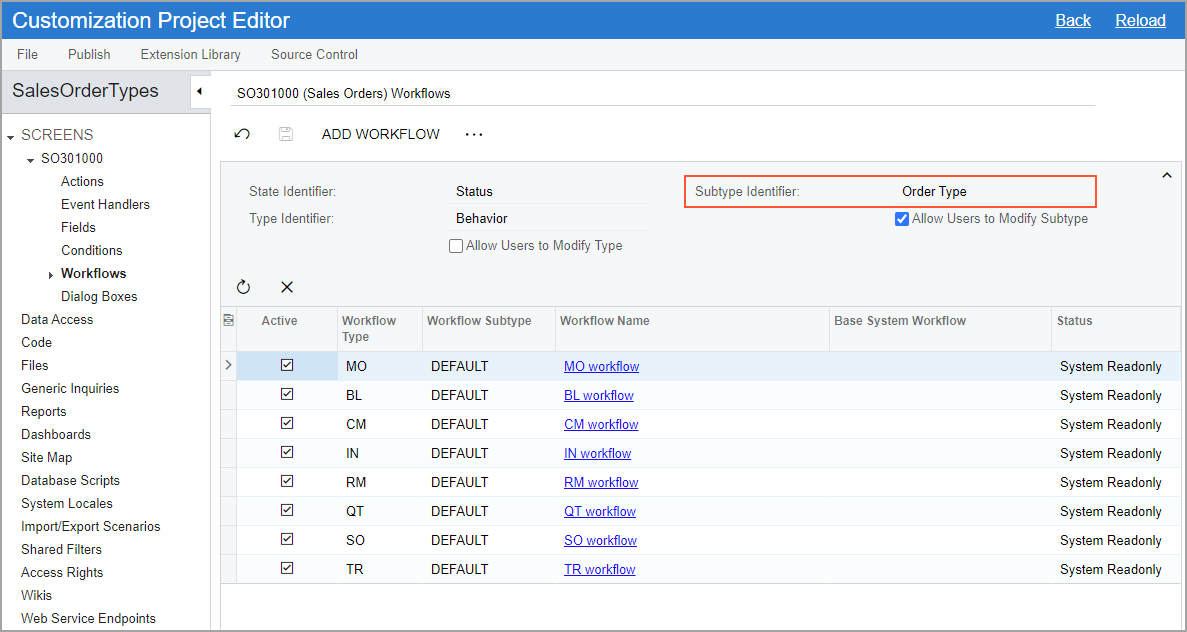
Suppose that on the Order Types (SO201000) form, you have created two custom order types (T1 and T2) that are based on the Sales Order automation behavior. For each form that has a workflow-identifying field specified in the predefined system workflow, as is the case with the Sales Orders (SO303000) form, the system displays a workflow-identifying field of the second level on the Workflows page (the Order Type field in the following screenshot).
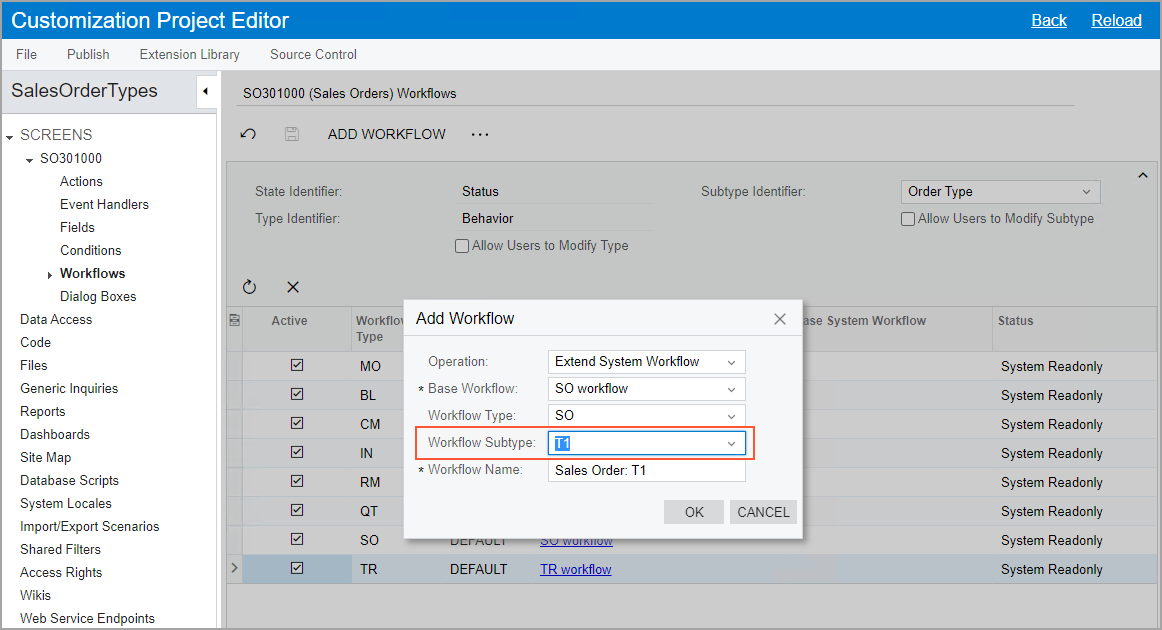
Then in the Add Workflow dialog box, which opens when you click the Add Workflow button on the page toolbar of the Workflows page, you can select one of the created order types (T1 or T2) as a workflow subtype (see the following screenshot).
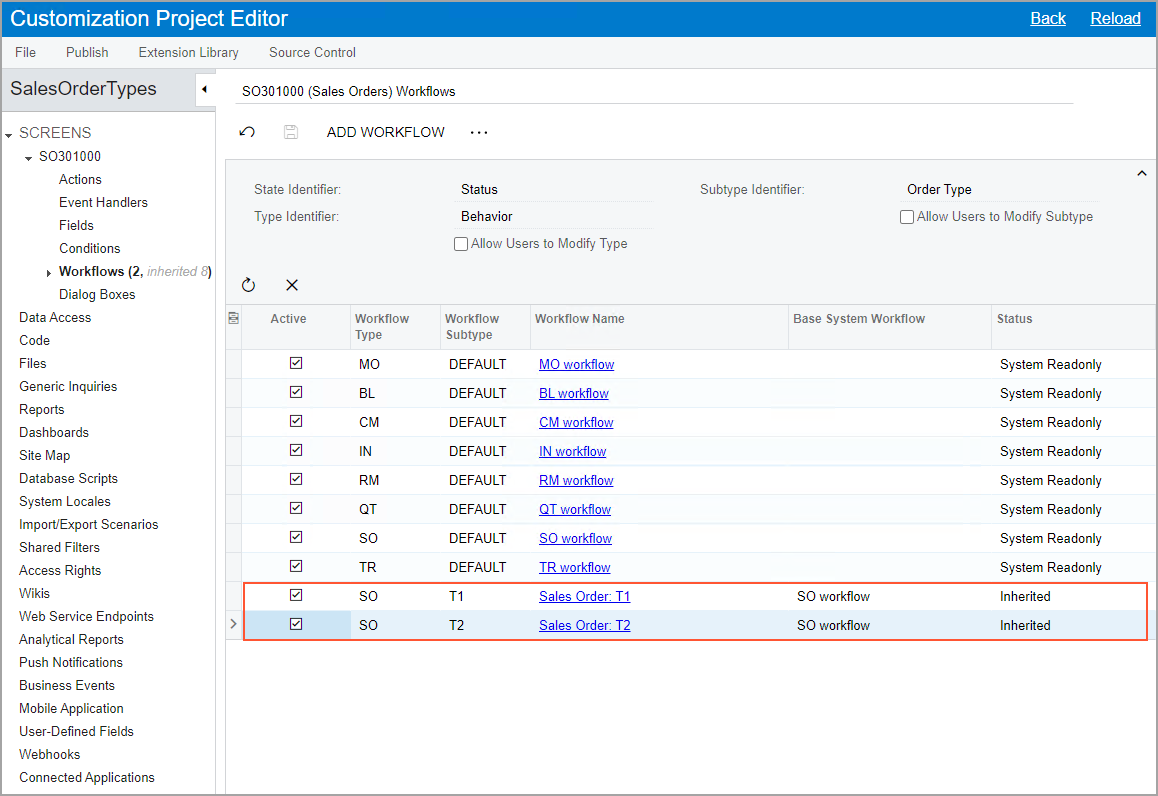
You then can define both created workflows as active by selecting the Active check box (see the following screenshot). Note that the base workflow (SO Workflow in this case) remains active as well. The system will use this workflow for sales orders that are based on other order types and that have the Sales Order automation behavior—that is, sales orders of the eCommerce Order, [11]SO automation behavior but SA order type2023/08/1418:29:11+03:00Sales Order with Allocation, and Sales Order types.
After you create a separate workflow for each custom order type, you can perform the usual operations with these workflows by using the Workflow (Tree View) or Workflow (Diagram View) pages: add, remove, or modify states, actions, fields, and transitions.
If you do not need to create separate workflows for each of the order types, you can keep the workflow with the Default subtype active. The system will use this workflow for sales orders that meet the following criteria:
- The behavior used for the sales orders is the same as the workflow type (for example, the behavior is SO and the workflow type is SO).
- Separate workflows have not been defined with this type and with a subtype that is the same as the order type.