
Selector Control: Configuration of the Lookup Table
You can configure the lookup table that is displayed when a user clicks the magnifier icon in the selector box.
Configuring the Add New Record Button
You can specify which action is executed when a user clicks the Add New Record button in the lookup table, as shown in the following screenshot. By default, the system opens the relevant form with an empty record (that is, no values except default ones are filled in). To specify the action, use the addCommand property of the qp-selector config property.
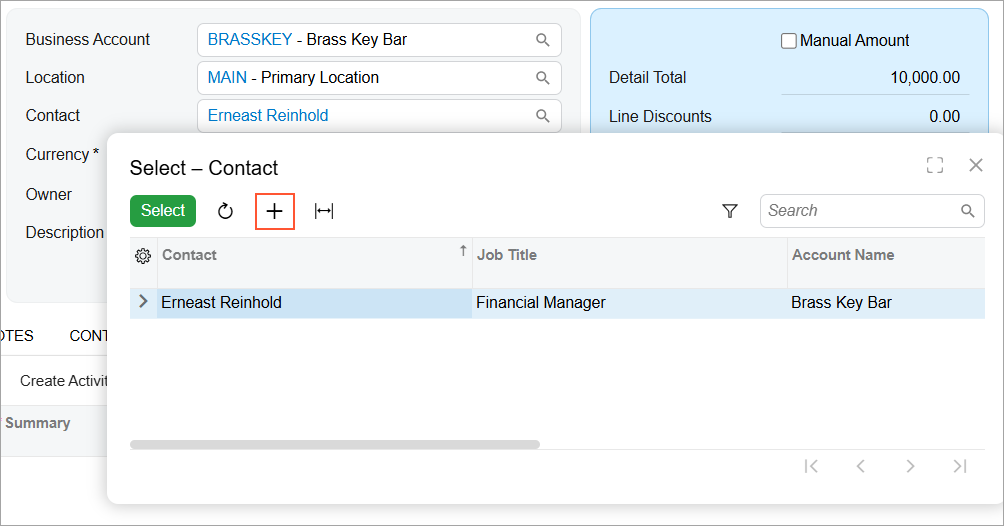
Suppose that when a user clicks the Add New Record button in the selector control, the [1]add example from Opportunities>Contacts when it is implementedqlk_pms_kdc2024/11/0419:18:21-05:00So are these prefilled values different than the default settings that are not related to user data (such as default options in boxes)? I suppose this relates back to my previous question: I am not sure if the situation in the previous paragraph causes the other default settings to be inserted, so I am not sure whether this is something different.1qlk_pms_kdc12024/11/1812:18:56-05:00system needs to open a new record with prefilled values that depend on the user's data. For that purpose, you need to do the following:
- In the backend, define an action that opens a form with a new record and prefills the values depending on the user's data.
- In the frontend, declare a PXActionState property in the screen class for this action.
- In the controlConfig decorator for the form field, specify the action
in the addCommand property, as shown in the following
example.
export class CROpportunityHeader extends PXView {
  @controlConfig({addCommand: "CreateNewContact"})
  ContactID: PXFieldState<PXFieldOptions.CommitChanges>;
}
Sorting Rows in the Lookup Table
By default, the rows in the lookup table are sorted as follows:
- If only plain text is displayed in the selector box (
displayMode =
            "text"
), the lookup table is sorted by the value of thetextFieldproperty. The default value of the textField property is the SubstituteKey value of the PXSelector attribute on the DAC field. - Otherwise, the sorting is performed by
valueField. The default value of the valueField property is the field in the Search<> command of the PXSelector attribute on the DAC field.
You can specify the field for sorting rows in the lookup table by specifying the column name in the textField property of the qp-selector config property. An example is shown in the following code.
@columnConfig({
  displayMode: GridColumnDisplayMode.Both,
  editorConfig: {
    textField: "title", displayMode: "text"
  }
})
ScreenID : PXFieldState;
For more details on the valueField and textField properties, see Selector Control: Manual Configuration of the Value and Text.