
[1]I looked at the structure of the guide once more and noticed the following: 1. Acumatica Customization Platform consists of concepts only, it does not include any procedures, and the name of the part does not presume any "doing". 2. On the other hande, we have multiple parts with "Doing" in their names, which are suitable for procedures. Therefore, I suggest the following: 1. Leave in the Acumatica Customization Platform part this topic (Extension Library) with the changes you've made. 2. Move To Convert DAC Extension to an Extension Library to Managing Items in a Project > Customized Data Classes 3. Delete To Move a Code Item To the Extension Library cause it duplicates existing topic (see comments in To Move a Code Item To the Extension Library). 4. Move To Create an Extension Library to Integrating the Project Editor with Microsoft Visual Studio 2018/06/2016:41:26+03:00Extension Library
An extension library is a Microsoft Visual Studio project that contains customization code and can be individually developed and tested.
If you need to deploy the customization code of an extension library to another system, you have to add the library to a customization project as a File item to include it in a customization package. See To Add a Custom File to a Project for details.
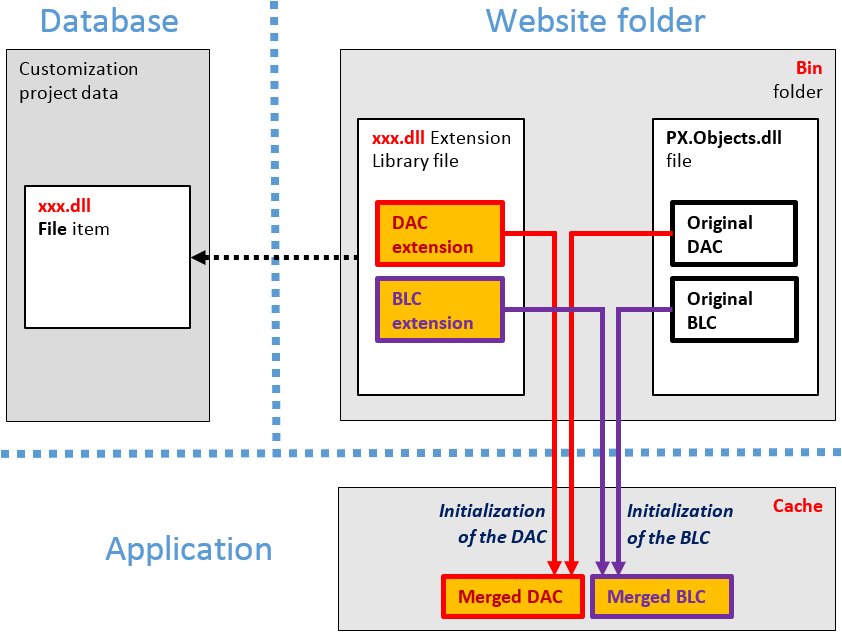
An extension library .dll file must be located in the Bin folder of the website. At run time during the website initialization, all the .dll files of the folder are loaded into the server memory for use by the MYOB Acumatica application. Therefore, all the code extensions included in a library are accessible from the application.
During the first initialization of a base class, the MYOB Acumatica Customization Platform automatically discovers an extension for the class in the memory and applies the customization by replacing the base class with the merged result of the base class and the discovered extension.
The use of extension libraries that are precompiled provides a measure of protection for your source code and intellectual property.