
Vizual Personnel Data Export
Introduction
The Employee List Export utility extracts employee details from the following tabs of the Employee Information screen:
-
Standard
-
Payment
-
Leave
-
KiwiSaver
-
Superannuation
This data can be imported into HR systems like Vizual Personnel Manager and People Inc.
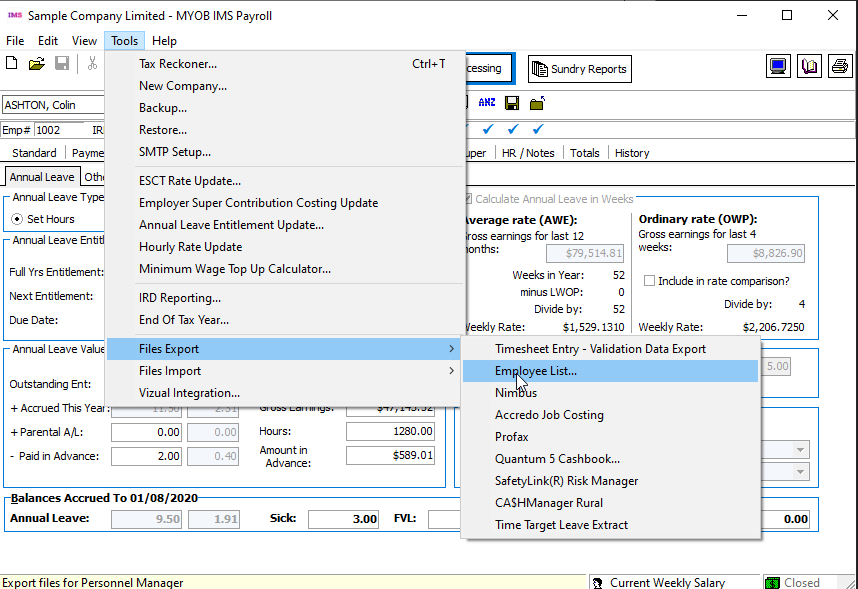
The Employee List Export utility is found in MYOB IMS Payroll Partner at Tools menu > Files Export > Employee List. Access to this option is restricted if User Security is enabled and the user does not have access to the Payroll Processing section of the program.
File Format
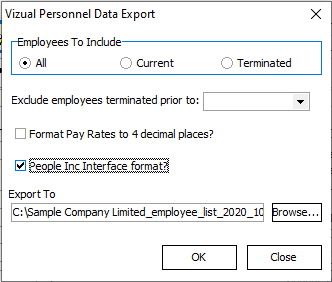
The Vizual Personnel Data Export generates a .txt file named “Personnel.txt”. The destination of this file can be entered when exporting; it defaults the associated Payroll Company folder. The fields are comma delimited.
String Fields
String (alphanumeric text) field values are delimited by double-quotes (speech-marks), e.g.
“Accounting Department” or “Oughten, Peter James” or “Manager”
Numeric Fields (Integer & Floating Point Decimal)
Numeric (integer and decimal) field values do not contain any formatting characters other than a leading sign (-) when applicable, and for decimal numbers a decimal point (.) e.g.
12.45, -15.1234, 42, -5
Decimal values greater than zero (0) but less than one (1) contain a leading zero before the decimal point e.g.
0.15
Decimal values less than zero (0) but greater than negative one (-1) contain a leading zero before the decimal point e.g.
-0.15
Numeric values are not enclosed in double-quotes.
Date Fields
Date fields appear in the data file in the format “dd/mm/ccyy” by default. Date values are not enclosed in double-quotes.
When using this export in conjunction with the People Inc HR package, the option People Inc Interface format? should be selected (see page 2). This will have the effect of formatting all dates within the export file in "ccyy-mm-dd" format.
Titled Columns
A Column Header record is included, is the first record in the file and lists the names of the fields for which data is being supplied. The order and number of fields contained in each data record match the order, number and data types of the fields specified in the Column Header record.
Export Options
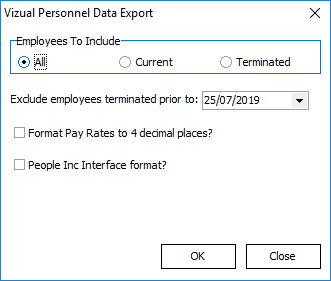
Employees to Include: Select whether to include All employees, Current (non-terminated) employees or Terminated employees only.
Exclude employees terminated prior to date: This option can be used with the ‘All’ and “Terminated” option above to filter out terminated employees with a termination date prior to the date entered.
Format Pay Rates to 4 decimal places? Select whether employee hourly pay rates, where applicable, are to be in 2 or 4 decimal place format.
People Inc Interface format? Select this option if using the export in conjunction with the People Inc HR software package. Dates will be reformatted in "ccyy-mm-dd" format.
Export File Columns
|
Column Heading |
IMS Payroll Partner Data |
|
EmpNo |
User allocated Employee Identifier (if present) |
|
Surname |
Surname |
|
FirstNames |
Christian Names |
|
PostalAddress1 |
Postal Address Line 1 |
|
PostalAddress2 |
Postal Address Line 2 |
|
PostalAddress3 |
Postal Address Line 3 |
|
PostalAddress4 |
Postal Address Line 4 |
|
HomePhone |
Home Phone Number |
|
HomePhone2 |
Second Phone Number |
|
Gender |
Male / Female |
|
Occupation |
Occupation |
|
Paypoint |
Pay Point as assigned |
|
CostCode |
Home Cost Code (if Costings activated) |
|
StartDate |
Date employment started – dd/mm/ccyy or ccyy-mm-dd |
|
FinishDate |
Date employment terminated – dd/mm/ccyy or ccyy-mm-dd |
|
BirthDate |
Date of Birth – dd/mm/ccyy or ccyy-mm-dd |
|
IRDNumber |
Inland Revenue Number |
|
TaxCode |
Inland Revenue Tax Code |
|
PayFrequency |
Pay Frequency – Weekly, Fortnightly, Monthly, Half Monthly, Four Weekly |
|
EmployeeType |
Salary / Wage |
|
Salary |
Salary per pay period (if applicable) |
|
HourlyRate1 |
Hourly Rate – 2 or 4 decimal points as selected |
|
HourlyRate2 |
Hourly Rate – 2 or 4 decimal points as selected |
|
HourlyRate3 |
Hourly Rate – 2 or 4 decimal points as selected |
|
HourlyRate4 |
Hourly Rate – 2 or 4 decimal points as selected |
|
HourlyRate5 |
Hourly Rate – 2 or 4 decimal points as selected |
|
PaymentMethod |
Direct Credit – Cash - Cheque |
|
AnnualLeaveType |
Full Time (Set Hours) – Part Time (variable hours) - Casual |
|
AnnualLeaveIn |
Annual Leave units in Hours or Days |
|
SpecialLeaveIn |
Sick Leave units in Hours or Days |
|
LieuLeaveIn |
Alternative Leave in Hours Or Days |
|
ALFullYrsEntitlement |
Annual Leave Full Year Entitlement Units |
|
AL%ofGross |
Annual Leave percentage of Gross |
|
ALNextEntitlement |
Annual Leave Next Entitlement Units |
|
ALDueDate |
Annual Leave Anniversary Date – dd/mm/ccyy or ccyy-mm-dd |
|
ALOutstanding |
Annual Leave Outstanding Units |
|
ALLastYrRate |
Obsolete |
|
ALPrevYrRate |
Obsolete |
|
ALGrossEarnings |
Annual Leave related Gross Earnings since last Anniversary |
|
ALHours |
Annual Leave ordinary hours worked since last anniversary |
|
ALAccruedThisYear |
Annual Leave units accrued since last anniversary |
|
ALPaidInAdvanceQty |
Annual Leave units paid in advance of entitlement |
|
ALPaidInAdvance$ |
Annual Leave amount paid in advance of entitlement |
|
ALBalance |
Annual units Balance – Outstanding + Accrued – Paid in Advance |
|
ALAccruedToDate |
Date Annual Leave units accrued to |
|
SLFullCycleEntitlement |
Sick Leave Full cycle entitlement |
|
SLMths |
Sick Leave Cycle in Months |
|
SLNextEntitlement |
Sick Leave next entitlement units |
|
SLMax |
Sick leave maximum units to accrue |
|
SLDueDate |
Sick Leave Anniversary Date – dd/mm/ccyy or ccyy-mm-dd |
|
SL%Gross |
Sick Leave percentage of gross |
|
SLBalance |
Sick Leave units balance |
|
LLOutstanding |
Alternative Holiday Units Balance |
|
EmailAddress |
Email Address |
|
EmailPayslip |
Email Payslip – Yes / No |
|
GSCM |
Government Salary Calculation Method – Yes / No |
|
HoursPerDay |
Standard Hours worked per Day |
|
HoursPerPeriod |
Standard Hours worked per Pay Frequency |
|
DateDueBack |
Date Due Back – dd/mm/ccyy or ccyy-mm-dd |
|
BankAccount |
Direct Credit Bank Account |
|
Apprentice |
Apprentice – Yes / No |
|
ApprenticeHours |
Apprentice Hours Worked |
|
If Service Leave is activated: |
If Service Leave is activated: |
|
AALEntitlementDate |
Additional Annual Leave Entitlement Date |
|
AALEntitlement |
Additional Annual Leave Entitlement |
|
AALNewPercent |
Additional Annual Leave New % Gross |
|
ACLStartDate |
Additional Company Leave Start Date |
|
ACLFullEntitlement |
Additional Company Leave Full Entitlement |
|
ACLNextEntitlement |
Additional Company Leave Next Entitlement |
|
ACLDueDate |
Additional Company Leave Due Date |
|
ACLAccruedThisYear |
Additional Company Leave Accrued This Year |
|
ACLOutstanding |
Additional Company Leave Outstanding |
|
ACLPayOnTermination |
Additional Company Leave Pay on Termination indicator |
|
LongServiceLeaveIn |
Long Service Leave Units |
|
LSLDueDate1 |
Long Service Leave Due Date (1) |
|
LSLEntitlement1 |
Long Service Leave Entitlement (1) |
|
LSLDueDate2 |
Long Service Leave Due Date (2) |
|
LSLEntitlement2 |
Long Service Leave Entitlement (2) |
|
LSLDueDate3 |
Long Service Leave Due Date (3) |
|
LSLEntitlement3 |
Long Service Leave Entitlement (3) |
|
LSLDueDate4 |
Long Service Leave Due Date (4) |
|
LSLEntitlement4 |
Long Service Leave Entitlement (4) |
|
LSLOutstanding |
Long Service Leave Outstanding |
|
LSLPayOnTermination |
Long Service Leave Pay On Termination indicator |
|
If Shift Leave is activated: |
|
|
ShiftLeaveIn |
Shift Leave Units |
|
SHLStartDate |
Shift Leave Start Date |
|
SHLFullEntitlement |
Shift Leave Full Entitlement |
|
SHLNextEntitlement |
Shift Leave Next Entitlement |
|
SHLDueDate |
Shift leave Due Date |
|
SHLAccruedThisYear |
Shift Leave Accrued This Year |
|
SHLOutstanding |
Shift Leave Outstanding |
|
SHLPayOnTermination |
Shift Leave Pay On Termination |
|
SHLCeased |
Shift Leave Ceased indicator |
|
ShiftLeaveBalance |
Shift Leave Balance (Accrued + Outstanding) |
|
ACCCU |
ACC Class unit |
|
STCExpiryDate |
Special Tax Code Expiry Date |
|
PAYEOverride |
PAYE Override rate |
|
EMOLOverride |
Extra-emolument Override rate |
|
SLRDOverride |
Student Loan Repayment Deduction Override amount |
|
PPInt_Apprentice |
Special Apprentice Indicator - False / True |
|
PPInt_GSCM |
Special GSCM Indicator - False / True |
|
PPInt_PaymentMethod |
Payment method indicator – Bank / Cheque / Cash |
|
PPInt_ApplyRelevantRate |
Special Apply Relevant Rate indicator - False / True |
|
KSEntryStatus |
KiwiSaver Entry Status – Opt in – Not Eligible – Auto Enrol - Existing |
|
KSOptInDate |
KiwiSaver Opt In Date – dd/mm/ccyy or ccyy-mm-dd |
|
KSCtribHoliday |
KiwiSaver Contribution Holiday – Yes / No |
|
KSCtribHolCeaseDate |
KiwiSaver Contribution Holiday Ceased Date – dd/mm/ccyy or ccyy-mm-dd |
|
KSOptOut |
KiwiSaver Opt Out – Yes / No |
|
KSOptOutDate |
KiwiSaver Opt Out Date – dd/mm/ccyy or ccyy-mm-dd |
|
KSOptOutBankAccount |
KiwiSaver Opt Out Bank Account |
|
KSOptOutBankAccName |
KiwiSaver Opt Out Bank Account in Name of |
|
KSSSCWTPriority |
KiwiSaver SSCWT Exempt Priority – KiwiSaver / Compliant Fund |
|
KSEContribution |
KiwiSaver Employee Contribution - Yes / No |
|
KSEPercentage |
KiwiSaver Employee Contribution Rate |
|
KSRContribution |
KiwiSaver Employer Contribution - Yes / No |
|
KSRPercentage |
KiwiSaver Employer Contribution Rate |
|
KSRInclusiveRate |
KiwiSaver Employer Rate Contributes to Employee Rate – Yes / No |
|
KSRSSCWTRateCode |
KiwiSaver SSCWT Rate for employers contribution |
|
KSRGLAccount |
KiwiSaver Employer Contribution General Ledger Code |
|
KSRCostCentre |
KiwiSaver Employer Contribution Cost Code |
|
KSComplyingFund |
Compliant Fund active – Yes / No |
|
KSCFScheme |
Compliant Fund Scheme |
|
KSCFReference |
Compliant Fund Scheme Reference |
|
KSCFEContribution |
Compliant Fund Employee Contribution – Yes / no |
|
KSCFEPercentage |
Compliant Fund Employee Contribution Rate |
|
KSCFRContribution |
Compliant Fund Employer Contribution – Yes / No |
|
KSCFRPercentage |
Compliant Fund Employer Contribution Rate |
|
KSCFRSSCWTRateCode_1 |
No Longer in use |
|
KSCFRGLAccount |
Compliant Fund Employer Contribution General Ledger Code |
|
KSCFRCostCentre |
Compliant Fund Employer Contribution Cost Code |
|
KSRCalcMethod |
Obsolete in v3.10 |
|
KSRFixedAmount |
KiwiSaver Employer Fixed Amount Contribution |
|
KSCFRCalcMethod |
Obsolete in v3.10 |
|
KSCFRFixedAmount |
Compliant Fund Employer Fixed Amount Contribution |
|
TimeInLieuIn |
Time In Lieu Units In (Hours / Days) |
|
TILPayOnTerm |
Time In Lieu Pay Balance on Termination indicator |
|
TILBalance |
Time In Lieu Balance |
|
ReviewDate |
Review Date - dd/mm/ccyy or ccyy-mm-dd |
|
If Company Superannuation is activated: |
If Company Superannuation is activated: |
|
SuperScheme |
Employee Scheme |
|
SuperRef |
Employee Reference |
|
SuperCalcMethod |
Employer Contribution – Calculation Method (% Earnings or Fixed) |
|
SuperPercRate |
Employer Contribution – Percentage |
|
SuperFixedRate |
Employer Contribution – Fixed Amount |
|
SuperLimit |
Employer Contribution – Limit |
|
SuperGLAccount |
Employer Contribution – General Ledger account |
|
SuperCostCentre |
Employer Contribution – Cost Code |
|
SuperTaxMethod |
Employer Contribution – Tax Free / Tax Inclusive / Tax Exclusive |
|
SuperTaxRate |
Employer Contribution – ESCT rate (10.5,17.5,30 or 33%) |
|
KSRETCGLAccount |
KiwiSaver Employer ETC GL Account |
|
KSCFRETCGLAccount |
KiwiSaver Compliant Fund Employer ETC GL Account |
|
CECExempt |
Employer exempt from Compulsory Employer Contributions (Yes or No) |
|
Contract |
Employee Contract |
|
Preferred Name |
Employee Preferred Name |
|
TFHolidayGroup |
IMS Online Holiday Group (If IMS Online activated) |
|
PrintPayslip |
Print Payslip - yes / no |
|
Contractor |
Contractor - yes / no |
|
GSTRegistered |
GST Registered - yes / no |
|
ALCashUpEntitlement |
Annual Leave - Cash Up Entitlement |
|
ALCashUpTaken |
Annual Leave - Cash Up which has been Paid Out |
|
ALCashUpBalance |
Annual Leave - Cash Up Balance |
|
SLRDIncomeType |
Student Loan Repayment Deduction Income type (Primary : Secondary) |
|
SLRDCertType |
Student Loan Repayment Deduction Certificate type |
|
SLRDExpiryTaxCode |
Student Loan Repayment Deduction Expiry Tax Code |
|
KiwiSaverAsSalary |
KiwiSaver Employer Contribution Total Remuneration – yes / no |
|
KiwiSaverNetOrGross |
KiwiSaver Employer Contribution Total Remuneration – Net / Gross / blank |
|
NoOnlinePayslip |
Generate an Online Payslip (if IMS Online activated) |
|
ParentalLeave |
Parental Leave Activated or not |
|
PLStartDate |
Parental Leave Start Date |
|
PLExpectedDate |
Parental Leave Expected Date of Return |
|
PLFinishDate |
Parental Leave Finished Date (Actual Date Returned) |
|
PLEntitlementDate |
Parental Leave – date on which an Annual Leave anniversary occurred while the employee was on Parental Leave. |
|
PLOutstanding |
Parental Leave related Outstanding Annual leave units |
|
PLGrossEarnings |
Parental Leave – gross earnings as at when an Annual Leave anniversary occurred while the employee was on Parental Leave. |
|
PLPaidinAdvance |
Parental Leave – amount paid in advance as at when an Annual Leave anniversary occurred while the employee was on Parental Leave. |
|
PLCashUp |
Parental Leave – indicator that the Annual Leave Cash Up units relate to Parental Leave entitlement. |
|
PayeeReference |
Bank Account Reference |
|
PayeeParticulars |
Bank Account Particulars |
|
PayeeCode |
Bank Account Code |
|
DateUpdated |
Date file Generated – dd/mm/ccyy or ccyy-mm-ddThis will always be the last field in the record. |