
Menu: General Information
A menu is a drop-down control that provides a list of commands.
A menu is defined by the qp-menu tag in the Modern UI. (The control is not supported by the Classic UI.)
Learning Objectives
In this chapter, you’ll learn the following about the menu:
- Its design guidelines, including naming conventions and layout recommendations
- The configuration of the menu commands (options)
- The proper configuration of the menu for specific cases, such as the implementation of an event handler for the menuselected event
Applicable Scenarios
- You want to add a drop-down menu to a specific area of a form, such as qp-template or a table toolbar
- You want to add a menu to a tile of the data feed control
Overview of the Menu Control
The menu control consists of a button that opens the menu and the drop-down menu. The drop-down menu contains menu commands. An example of an opened menu control is shown below.
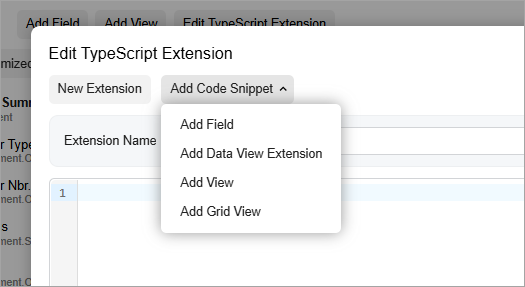
You can place the menu control anywhere on a form, such as a tab toolbar, dialog box, or tile of a data feed control.
To define the menu control:
- In the TypeScript file, define the configuration of the control. For details, seeMenu: Configuration of the Menu Control.
- Optional: Define the menuSelected event handler. For details, see Menu: Handling the MenuSelected Event.
- In the HTML template, add the qp-menu tag in the needed location. In the qp-menu tag, specify the configuration and the menuSelected event handler.
Menu ID
A menu’s ID consists of two parts: the menu prefix and the semantic name.,
which describes the menu’s purpose. For example, a menu that contains file options may have
the menuFileOptions ID, as the following code shows.
@observable fileMenuConfig:IMenuControlConfig = {
  id: "menuFileOptions,
  ...
}
A menu item’s ID consists of two parts: the semantic name and the Action
postfix. The semantic name should be identical to the graph action’s name. For example, a
menu item that adds a field may have addFieldAction ID, as the following
code shows.
options: [
  {
    id: "addFieldAction",
    commandName: "addField",
  },
  ...
]
UI Naming Conventions
The following table shows the UI naming conventions for menu commands.
| Naming Convention | Example |
|---|---|
| Use a verb or verb phrase that describes the process that’s initiated when a user clicks the command. Use title-style capitalization for command names. | The tile menu on the Company Profile (SP201000) form of the Customer Portal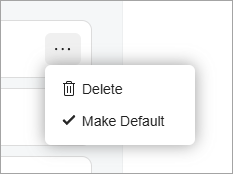 |
Recommendations for Organizing the Layout
When you want the qp-menu control to be displayed as a button, use the qp-button class. The button that opens the menu will be displayed on a gray background. Below you can see an example of the Add Code Snippet button, which is a qp-menu control.
When the qp-menu control is displayed on a tile of a data feed control, follow the layout recommendations for the data feed control.