Stocktake - Update Counts
When the Warehouse Bin Management module is in use, these fields are enabled on the Update/Finalise Stocktake Counts form:
Bin Tran Reference
The bin reference remains constant through all updates of the stocktake.
Bin Adjustments
If the item count does not match Greentree Desktop quantity per bin, Greentree Desktop creates a bin adjustment. The inventory positive and negative adjustments are calculated on the total of the bin adjustments for each item.
Stocktake Adjustment Transactions
Example 1
If the stocktake is over a single bin, adjustments are:
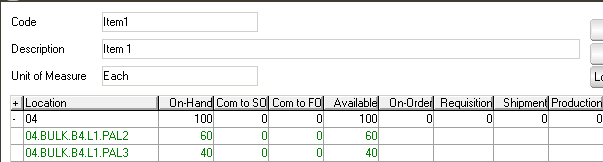
Stocktake is over the bin PAL2 - Item1.
In count entry 62 is entered for this bin.
When this updates, an inventory adjustment adds the 2 item to Bin Suspense. A bin adjustment increases the bin and clear the suspense balance. On-hand inventory is increased to 62 and PAL2 increased by 2.
Example 2
If the stocktake is over multiple bins within a stocking location:

If the:
- Counted inventory does not increase the quantity at the stocking location, the generated bin adjustments update the bin balance.:
- Counts increase the stocking location balance, the inventory transaction for the total difference updates the location and a generated bin adjustment updates the bin quantities.
Example 3
If a stock take was aborted part way through processing the count update, Greentree Desktop notes the transactions that have been updated. It removes them from the count and you can update the remaining item counts.
WBM items may appear with a suspense balance until the stocktake update is completed because the bin adjustments were processed before the inventory transactions update the stocking location.
For example, each bin increased by 1 in the stocktake, but the stocktake was aborted before completion. The suspense balance is -3 because an inventory location was not updated by a location adjustment.
When the stocktake resumes, Greentree Desktop correct this.