AR Invoice - L
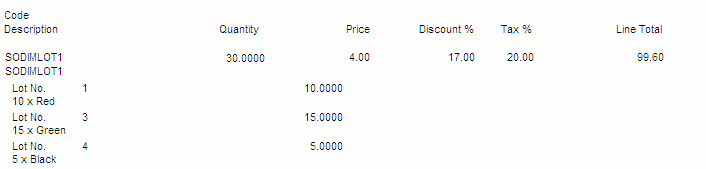
This report prints dimension details for invoice lines for dimension-controlled items. The examples below show how the details appear on the invoice:
Example 1: Lot Controlled and Dimension Controlled Item:
Example 2: Dimension Controlled Item only:

If an invoice line has more than one dimension for it, the dimensions print beneath the item (or serial/lot number, if applicable) on a single line, if the integer quantity and the dimension display, and each new dimension is separated by a comma (as seen in Example 2 above).
The total number of pieces of the invoice displays at the base of the report.