- Contents
- Index
- Search

Show results that include all search words
Eliminating Transactions
To eliminate transactions, select Utilities > Eliminate Transactions.
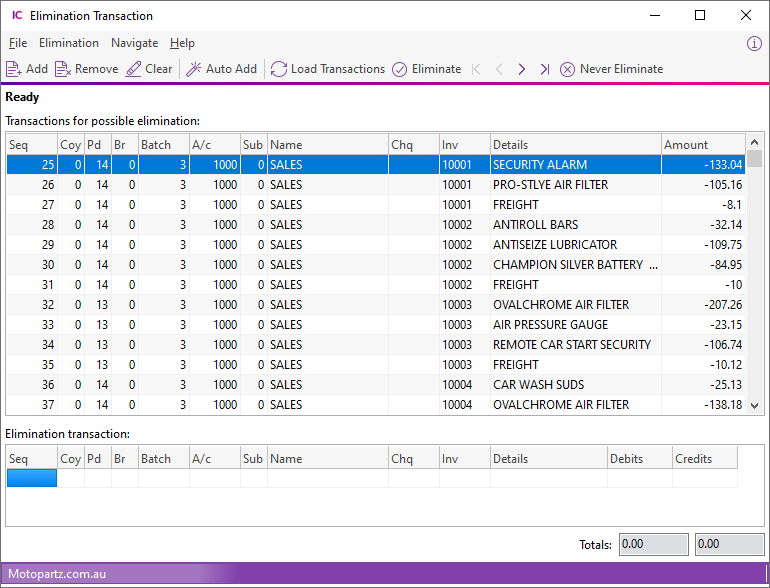
You can:
-
Click Load Transactions to retrieve all GL transactions for the contra accounts (those accounts defined in Setup > GL Contra Accounts). This will populate the upper half of the screen, which shows all transactions that were found for the contra accounts – these are the transactions for possible elimination.
-
Double click a row in the top grid, or select it and click Add, to transfer the transaction to the lower grid.
-
Click Remove to clear the selected transactions out of the lower grid.
-
Click Clear to clear all transactions out of the lower grid.
-
Click Auto Add to transfer all transactions to the lower grid.
-
Click Never Eliminate to flag a transaction to be never eliminated. You are prompted to confirm - click Yes, and this transaction will no longer be available for selection for elimination.
Once all transactions that you want to eliminate have been transferred to the lower grid, click Eliminate to creates a GL Journal to eliminate the selected transactions. A confirmation message displays. Click Yes and the journal entry screen displays:
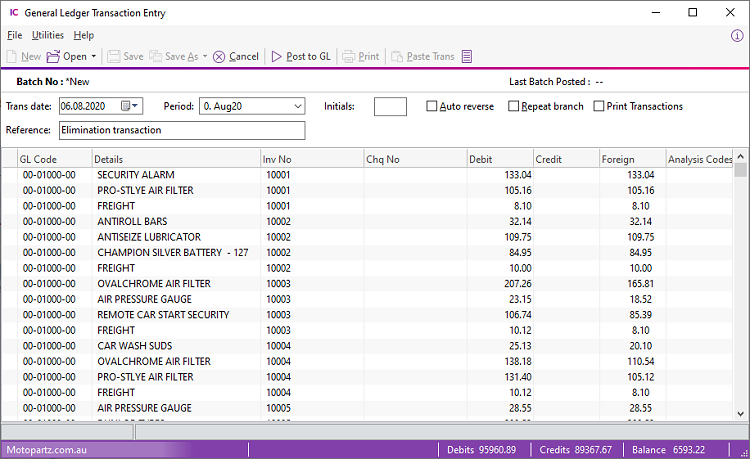
Click Post to GL to eliminate the transactions.