- Contents
- Index
- Search

Show results that include all search words
Managing Sales Order Batches
A session may also be suspended for later recall using the Close button. While a sales order line is “owned” by an unprocessed batch it is tagged with the batch number. This prevents it being processed using another EXO Business function or being added to another Batch Sales Order Line Processing batch. This is true for both suspended (closed) batches, as well as one currently open on a workstation.
Loading an Existing Batch
A batch may be suspended without processing by clicking the Close button and then recalled for further amendment or processing. Processed batches that were not deleted after processing may also appear but can only be opened for viewing.
When first opened, the Batch Sales Order Line Processing function displays a grid of batch headers, including previous batches.
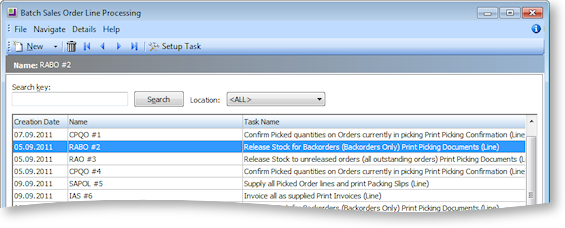
Double-click the desired batch to open it and continue editing.
Deleting an Existing Batch
If a batch is no longer required, it may be deleted from the system. This includes batches that were suspended or not deleted after processing. Deleting a suspended batch returns the Sales Order lines to the un-batched pool. Any unprocessed quantities remain in the Sales Order line pending processing as part of another future batch or if processing the Sales Orders as part of another workflow.
To delete an existing batch, select the desired batch and click the  button.